
If you are reading this, you are probably weighing whether to buy your first wireless tattoo machine, or you have used one and you are not sure if the next one should be wireless again. This is the guide I wish existed when I started building wireless machines.
I am Oleg Mozhey. I have spent the last 14 years engineering tattoo machines, including the RightStuff REVO and REVO SHOT. I am not a tattoo artist. I am the person who designs the drive mechanism, sources the motors, and rebuilds the prototype 50 times until it stops failing. That gives me a specific point of view on this question, and an obvious commercial bias — I make wireless machines, so of course I think wireless is good. I will try to be honest about both the strengths and the real limitations.
This post is not a brand comparison. If you want that, read our best tattoo machine brands article. This post is about whether wireless is right for you, what to look for in a wireless machine, and what most artists get wrong when they switch.
Quick answer
For most working tattoo artists in 2026, wireless is the right choice. The mechanical performance gap between top wireless machines and corded rotaries has effectively closed. Cord-free movement, cleaner workspace, and easier travel for guest spots and conventions outweigh the trade-offs. The exceptions: artists who only work at one fixed station with a power supply they trust and want to spend less, and artists who prefer specific corded machines (Inkjecta Flite Nano, certain coil setups) for mechanical-feel reasons.
The hard part is not whether to go wireless. It is which wireless machine to choose, what stroke to order, and how to avoid wasting €700 on a machine that does not match your style.
What “wireless” actually means in a tattoo machine
A wireless tattoo machine has its battery integrated into the machine body or attached as a small pack on the rear. There is no cable from machine to power supply. You charge the battery, you tattoo, you charge again.
That is the whole concept. Everything else — the drive mechanism, the stroke length, the motor — works the same way as a corded rotary. A wireless machine is not a different category of tool. It is a rotary tattoo machine with a battery on it.
This matters because the marketing around wireless makes it sound revolutionary. It is not. The drive systems inside wireless machines (direct drive, swash plate, slider, or in our case K-PULSE™) are the same drive systems used in corded rotaries. The wireless innovation is the battery integration and the motor electronics, not the tattooing mechanism itself.
Why wireless became the default
Five practical reasons working artists moved to wireless over the past 5 years:
1. Workspace cleanliness. No cord means nothing to drag through ink, nothing to drape over a client, nothing to disinfect at the end of the day. For hygiene-conscious studios, this matters.
2. Movement. Tattooing the back of a thigh or the inside of a forearm with a corded machine means dragging the cord across the body, snagging it, repositioning. Wireless removes the dance.
3. Guest spots and conventions. Travel becomes simpler. No power supply to pack, no foot pedal, no cables. A wireless machine, two batteries, a charger, a case. Done.
4. Client comfort. Less equipment around the client area is less intimidating. New clients especially feel more relaxed.
5. Speed of setup. Pop battery in, turn on, set voltage, start tattooing. 30 seconds of setup instead of 5 minutes of cable management.
If none of those five things matter to your work, wireless does not give you anything that justifies the price premium. Stay corded.
Where wireless still falls short
Honest list. Most blog posts about wireless tattoo machines skip this section. Read it carefully before you spend €700 on one.
Battery life is finite. A 2,600 mAh battery (REVO standard) gives 8 to 12 hours depending on voltage and how aggressively you tattoo. A 1,600 mAh battery (REVO SHOT, FK Irons PowerBolt II, etc.) gives 4 to 6 hours. If you do 12-hour back-to-back sessions, you need a second battery. Most wireless machines come with two for this reason. Anyone selling you a single-battery wireless machine is selling you an incomplete tool.
Weight distribution is different. A wireless machine has the battery in the body, which shifts the center of gravity rearward compared to a corded rotary. Some artists adjust to this in a session. Some never fully adjust. If you have used a Cheyenne Hawk (corded) for years, the first time you hold a Sol Nova Unlimited II it will feel different in your hand. This is normal. Give it 3 to 5 sessions before deciding.
Replacement battery cost. When the battery degrades after 2 to 3 years of daily use, you replace it. A genuine OEM replacement battery from FK Irons or RightStuff costs €40 to €80. Cheap third-party batteries exist. Do not use them. Voltage instability from a bad battery will damage the motor.
Repair complexity. A corded rotary is a motor and a cable. A wireless machine is a motor, a battery management system, charging electronics, often Bluetooth or display electronics, all packed into a sealed body. When something fails, the machine goes back to the manufacturer. There is no “open it up and rewire it” option.
Voltage drop under heavy load is real. Every wireless machine on the market — including ours — slows down slightly when working through dense skin or running a 25 magnum at full color packing. Corded power supplies maintain voltage more consistently. The gap is small for top machines and irrelevant for most work, but if someone tells you their wireless has “zero RPM drop under load,” they are lying. Physics does not care about marketing.
What to look for when choosing a wireless tattoo machine
Five things actually matter. The rest is noise.
1. Drive mechanism
Most wireless machines use direct drive (FK Irons Flux, Cheyenne SOL Nova) or proprietary drive systems (RightStuff K-PULSE™, Bishop’s Faulhaber-tuned setup). Direct drive is mature, reliable, and well understood — most artists started on direct drive and know what to expect. Proprietary drives offer specific benefits when designed well, but be skeptical of marketing claims. Ask what the drive actually does mechanically, not what the brochure says about it.
For our machines specifically: K-PULSE™ uses Magnetic Preload to keep stroke consistent under heavy load — large magnums, color packing, dense skin. This is genuinely useful for artists who work with bigger needle groupings. It is not a magic feature. It is a specific solution to a specific problem.
2. Stroke length
This is the single most important spec, and the one most beginners ignore.
Stroke length is how far the needle travels per cycle. Short strokes (3.0–3.5mm) hit faster and softer — good for fine lining, detail, realism. Long strokes (4.5–5.0mm) hit slower and harder — good for bold lining, color packing, traditional. Most wireless machines have a fixed stroke that you choose at order. Some let you swap drive cams. Most do not.
If you work mostly fine-line and realism: order 3.5mm.
If you do mixed lining and shading and you want one machine: order 3.8mm.
If you do color packing, traditional, or aggressive lining: order 4.2mm or 4.7mm.
Get this wrong and the machine will feel “off” no matter what voltage you run.
3. Battery configuration
Two batteries minimum. Single-battery setups force you to charge between clients. Dual battery configurations let you swap mid-session without stopping. For full-day artists, this is non-negotiable.
Battery capacity matters less than you think above 1,600 mAh. The difference between an 8-hour and a 12-hour battery is rarely the deciding factor — most artists charge between clients regardless.
4. Voltage range and adjustment
Pro wireless machines run between 3 and 9 volts. Most lining and shading happens between 6 and 8 volts. The machine should let you adjust voltage in 0.1V increments, not big steps. Smaller adjustments mean better control over how the needle hits.
Bluetooth and apps are optional. Some artists like adjusting voltage from a phone (FK Irons DarkLab, Cheyenne SOL Nova). Some find it annoying. Neither approach is “better” — pick what fits your workflow. The mechanical performance is identical either way.
5. Service and warranty
This becomes important when something goes wrong. Important questions to ask before buying:
- Where does the machine ship from? (Affects repair turnaround time)
- Who handles warranty — the manufacturer or a distributor?
- What is the warranty period and what does it cover?
- How do you reach support — email, phone, Instagram DM?
Manufacturers who answer support directly usually fix problems faster than ones who route through resellers. RightStuff handles all warranty directly from Wrocław, Poland — same person who built your machine answers your support email. FK Irons and Cheyenne both have professional support teams. Bishop has direct artist relationships. Avoid brands where support is unclear or routes through Aliexpress sellers.
How to test a wireless machine before committing
You probably cannot test before buying — almost no manufacturer offers loaners. What you can do:
Watch real artist footage, not brand marketing. Search Instagram for the machine model + a long video. Watch them work. Listen to the motor sound during packing. Watch the needle stability when they go into the skin. Brand promotional videos hide problems. Real session footage shows them.
Read DM testimonials, not curated reviews. Brand websites show 5-star testimonials. Reddit, tattoo Discord servers, and Instagram comments under non-sponsored posts show honest opinions. Search “(brand name) review” on Reddit before buying.
Ask another artist who uses it. The tattoo community is usually generous with honest opinions in private. DM someone who posts the machine in their work and ask. Most will tell you what they actually think.
Check return policies. If the manufacturer offers a 14-day return window on unused machines, your risk is limited. RightStuff offers this. Many manufacturers do not.
Common mistakes when switching to wireless
Buying the wrong stroke. Default to 3.8mm if unsure. You can grow into both lining and shading at this stroke. Going too short or too long limits the machine to one technique.
Running too high voltage. Wireless machines run efficient motors. The voltage that worked on your old corded machine may be too much for a wireless. Start at 6V and adjust up by 0.2V increments until the hit feels right.
Comparing wireless to wireless without context. A €350 budget wireless from a Chinese brand and a €700 RightStuff or FK Irons are not the same product. They use different motors, different tolerances, different drive engineering. Watching YouTube comparisons that ignore the price tier is misleading.
Ignoring grip diameter. Most wireless machines come with 33mm or 32mm grip diameter as standard. If you have small hands, this can cause hand fatigue. Some machines accept thinner grips, some do not. Check before buying.
Buying based on Instagram presence. Heavily marketed brands are not always the best engineered. Smaller brands with quieter Instagram often build better tools. Marketing budget does not equal product quality. (I would say this — RightStuff has 63K followers but no paid ads, so I am biased here. The point still stands.)
Should beginners start with wireless?
Mixed answer. Yes if you can afford the €600–€900 entry price for a real pro wireless. No if your budget is under €300.
The reason: cheap wireless machines teach bad mechanical feedback. The motor lags, the stroke fluctuates, the machine fights you. A beginner does not yet have the technique to compensate for a bad tool, so they learn around the tool’s limitations. By the time they upgrade, they have built bad habits.
Cheap corded rotaries (Stigma Beast, certain Mast models, used FK Direkts on the second-hand market) give better mechanical feedback for the same money. Better feedback = better technique faster.
If your budget allows €650–€900, RightStuff REVO SHOT (€650), FK Irons Flux, or Cheyenne SOL Nova Unlimited II are all reasonable first wireless machines. If your budget is under €400, get a corded rotary first and go wireless when your work demands it.
The RightStuff REVO and REVO SHOT — honest positioning
Since I make these, I will keep this section short and honest.
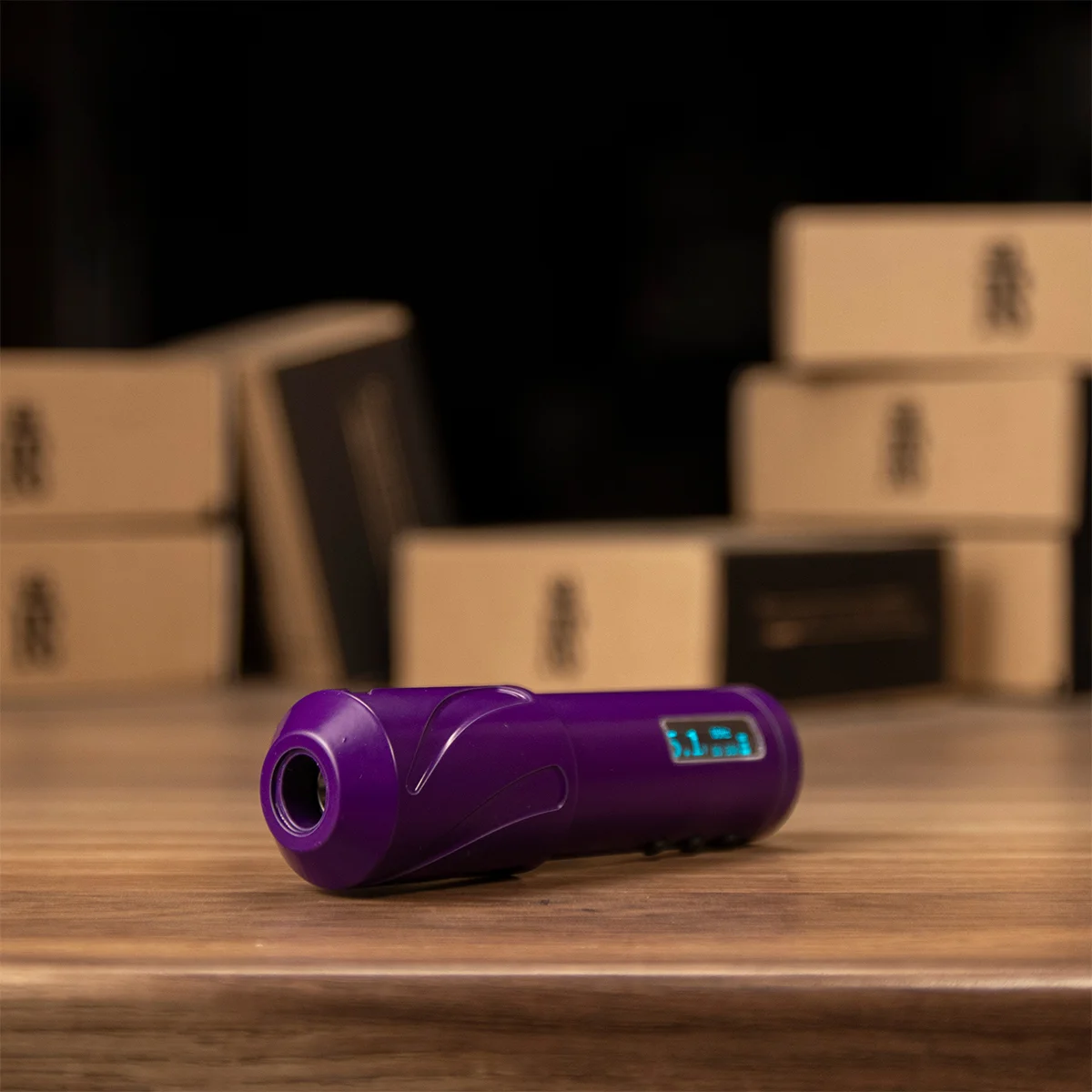
REVO is our full-size wireless pen. K-PULSE™ drive (utility patent filed), 5 stroke options ordered at purchase, 2,600 mAh battery, up to 12 hours runtime. €700 base, €765 fully customized. Ships with 2 batteries, dual charger, USB-C, case. The GIVE Switch lets you toggle between two mechanical modes — one for lining and detail, one for packing and magnums. One machine, two feels. Standard on all new units.
REVO SHOT is the compact version. 15mm shorter, 1,600 mAh battery, same K-PULSE drive, same GIVE Switch. €650. Ships with 2 batteries.
What we are good at: holding stroke under heavy load (big mags, packing, greywash), 5 stroke options at order, the GIVE Switch giving you two mechanical behaviors in one machine, direct manufacturer support from Poland, hand assembly.
What we are not: the lightest machine on the market (170g standard), the cheapest, or the most marketing-driven brand. We do not run paid ads. Discovery is mostly artist word-of-mouth.
If you want the engineering, the GIVE Switch, and direct manufacturer support, we are a good match. If you want the cheapest possible wireless or the brand with the most Instagram presence, we are not.
Are wireless tattoo machines as powerful as corded ones?
Yes, for working voltage ranges (3–8V) used in normal tattooing. The brushless DC motors in pro wireless machines deliver the same torque as corded rotary motors. The difference is at the highest voltage extremes (above 8V), where corded machines hold voltage more consistently. For 99% of tattoo work, the gap is invisible.
How long does a wireless tattoo machine battery last per charge?
Depends on capacity and voltage. A 2,600 mAh battery at 7V runs 8–12 hours. A 1,600 mAh battery at the same voltage runs 4–6 hours. Higher voltage and continuous heavy work shorten runtime. Most pro wireless machines ship with two batteries, so you swap when one runs low.
How long do wireless tattoo machine batteries last before they need replacement?
Quality lithium-ion batteries from major brands (FK Irons, Cheyenne, RightStuff, Bishop) last 2–3 years of daily professional use before noticeable capacity loss. Replacement OEM batteries cost €40–€80 each. Avoid third-party “compatible” batteries — voltage instability damages the motor.
Can you change the stroke on a wireless tattoo machine?
Most wireless pen machines have fixed strokes set at the factory. To change stroke, you order a different machine or send it in for service. Some machines (Inkjecta with cam swap kits, certain Bishop setups) allow user-changeable strokes, but this is rare. Choose your stroke carefully at order — it shapes how the machine works for years.
Is wireless better than coil for beginners?
Different tools. Coil is harder to learn but teaches mechanical feedback that no rotary fully replicates. Wireless rotary is easier to start with — set voltage, tattoo, no tuning required. For modern styles (realism, fine line, color), wireless is the practical first choice. For traditional and old-school styles, coil remains relevant. Many working artists own both.
Do wireless tattoo machines work with all needle cartridges?
All major wireless pen machines (FK Irons, Cheyenne, RightStuff, Bishop) accept standard cartridge needles — Cheyenne, Kwadron, Cheyenne Capillary, EZ, Vertix, etc. Some manufacturers recommend specific cartridge brands for optimal performance, but compatibility is universal across the industry.
What’s the difference between a wireless pen and a wireless rotary tattoo machine?
Pen and rotary often refer to the same category. “Pen” is a body shape — the machine looks and holds like a thick pen. “Rotary” is the mechanism — a rotating motor drives the needle. All modern wireless pen machines are rotary inside. The distinction matters more historically (when “rotary” meant a different shape) than in 2026.
Why are professional wireless tattoo machines so expensive?
A pro wireless machine sits between €600 and €900 because of CNC-machined precision frames, brushless DC motors with custom windings, integrated battery management electronics, tight assembly tolerances, and direct manufacturer warranty support. Cheap wireless machines under €300 skip most of this. For a tool used 6–8 hours a day, the difference is felt in your hand by the end of the session.
Which wireless tattoo machine is best for beginners?
If you can afford pro tier: RightStuff REVO SHOT (€650, 3.8mm stroke is a versatile starter), Cheyenne SOL Nova Unlimited II (3.5mm), or FK Irons Spektra Flux (4mm). All three are reliable, well-supported, and forgiving for someone learning. Avoid no-name Chinese pens at this stage — bad mechanical feedback teaches bad technique.
Are wireless tattoo machines reliable for full-day sessions?
Yes, with two batteries. Pro wireless machines from established manufacturers (FK Irons, Cheyenne, RightStuff, Bishop) hold up to full-day sessions when you swap batteries. Single-battery setups force charging breaks. Multi-day conventions and guest spots are where wireless really shows its value over corded.
RightStuff Tattoo Machines is based in Wrocław, Poland. We design, hand-assemble and ship the REVO and REVO SHOT wireless tattoo machines directly from Europe. K-PULSE™ utility patent filed.
Browse the full range at rightstuff.eu — REVO, REVO SHOT, K-PULSE™.

 English
  Deutsch
  Polski
  Français
  Italiano
  Español